Information for Oral Presenters
The Presentation
- Language
The official language of the conference is English. Simultaneous interpretation will be not available.
- Length of the Presentation
Strict adherence to time is required for the smooth running of the conference, here you will find the duration for each presentation type
– Plenary Lecture: 30 minutes incl. 3-5 min discussion time
– Keynote Lecture: 20 / 40 minutes incl. 3-5 min discussion time
– Session Lecture: 20 minutes incl. 3-5 min discussion time
– Short Talk: 5 /10 minutes incl. 2 minutes discussion time, max. 3 slides - Own laptop in general not possible
To avoid losing time between presentations and keep a smooth running, using your own laptop will not be possible. Exceptions will be only in case of special requirements.
Presentation files
- Format: Recommended slide format is 16:9
- Templates: You are welcome to use your own institute/company templates. If you would like to use EUROCORR 2026 branded template, you can download it here: https://we.tl/t-9fw1ne5jUHMnEJXO
- To avoid disruptions, we do not recommend embedded videos and no internet-based presentations
- Special Software/Videos
If you require internet/software for your presentation or if videos are included in your presentation, please inform the conference staff in advance. In this case we ask you to bring your own laptop as a backup. In case you need to use your own laptop or apple notebook, please provide your own video adapter - Please title your presentation file as follows:
“Day_local time_WP number_Lastname of presenting author” (i.e., Tuesday_1200_WP14_Magnan) - Presentations should be uploaded via WeTransfer at least 1 day before your presentation.
Please upload your presentation here: https://eurocorr2026.wetransfer.com
Speaker Preview Room
- Opening hours:
– Sunday 06/09: 17:00-19:00
– Monday 07/09: 08:30-16:30
– Tuesday 08/09: 08:30-16:30
– Wednesday 09/09: 08:30-16:30
– Thursday 10/09: 08:30-13:00 - Location:
To be confirmed - Facilities in Preview Room:
– Computers (Windows OS) to review and upload any changes to your presentation files to the server
– Support by technical staff
– The conference staff will dispatch the presentation files from the server in Preview Room to the laptops in corresponding lecture rooms.
Lecture Rooms
- A video projector and a presentation laptop will be provided in each lecture room
- Laptops will be equipped with Windows OS, MS PowerPoint and Acrobat Reader.
- All speakers will be able to find their presentations easily on the presentation laptop.
Documentation for Attendees (Proceedings)
- Book of Abstracts
A digital book of abstracts will be made available only to registered participants shortly before the conference.
- Distribution of lecture presentation files
We will not collect full or extended papers. Instead, we will collect the lecture presentations made available by authors and share them as pdf to registered participants for download shortly after the conference (see instructions below). The download will only be available until 30 November 2026 and only to registered participants. - Request for your presentation after the conference: 4 September – 13 September 2026
The upload of your presentation as pdf in the Converia paper management system (where you submitted your abstract) will be possible from 4 to 13 September 2026, 24:00.
This deadline is strict – uploads after this date can no longer be considered.
How to upload:
– Please log in on this page EUROCORR 2026 – Upload with your username and password.
– In your C³ Conference Control Center go to “View submitted contributions“
– There you click on your contribution and select “Action” and “Upload or edit presentation“
– Now you can upload your presentation as a pdf-file (max. capacity 5 MB)
– You will not receive a confirmation message. Instead you see this confirmation on your screen:
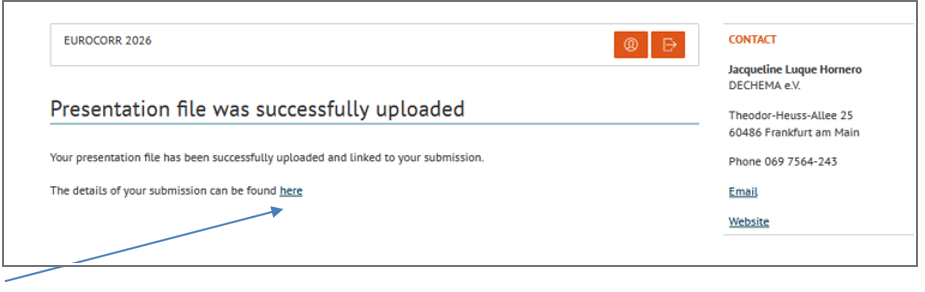
Here you can click and see if your presentation file was successfully uploaded.
Information for Poster Presenters
General Information
The posters will be presented and numbered according to the poster programme.
Set up and Take Down
All posters are to be mounted starting from the beginning of the conference on Monday, 7 September 2026, 10:00, and to be removed at the end of the conference on Thursday, 10 September 2026, until 13:30. Fixing material will be provided onsite.
Poster Sessions
The poster sessions will take place:
A. Monday 7 September 2026, 13:45 – 14:30 – Poster Session – Part 1
(Posters to be discussed: WP 01 – WP 11)
B. Tuesday 8 September 2026, 13:45 – 14:00 – Poster Session – Part 2
(Posters to be discussed: WP 13 – JS 10)
IMPORTANT: Please be present at your poster during the corresponding poster session. Please check the on-site conference programme which poster number you have
Further opportunities to present/discuss the posters will be during the breaks.
Technical Information
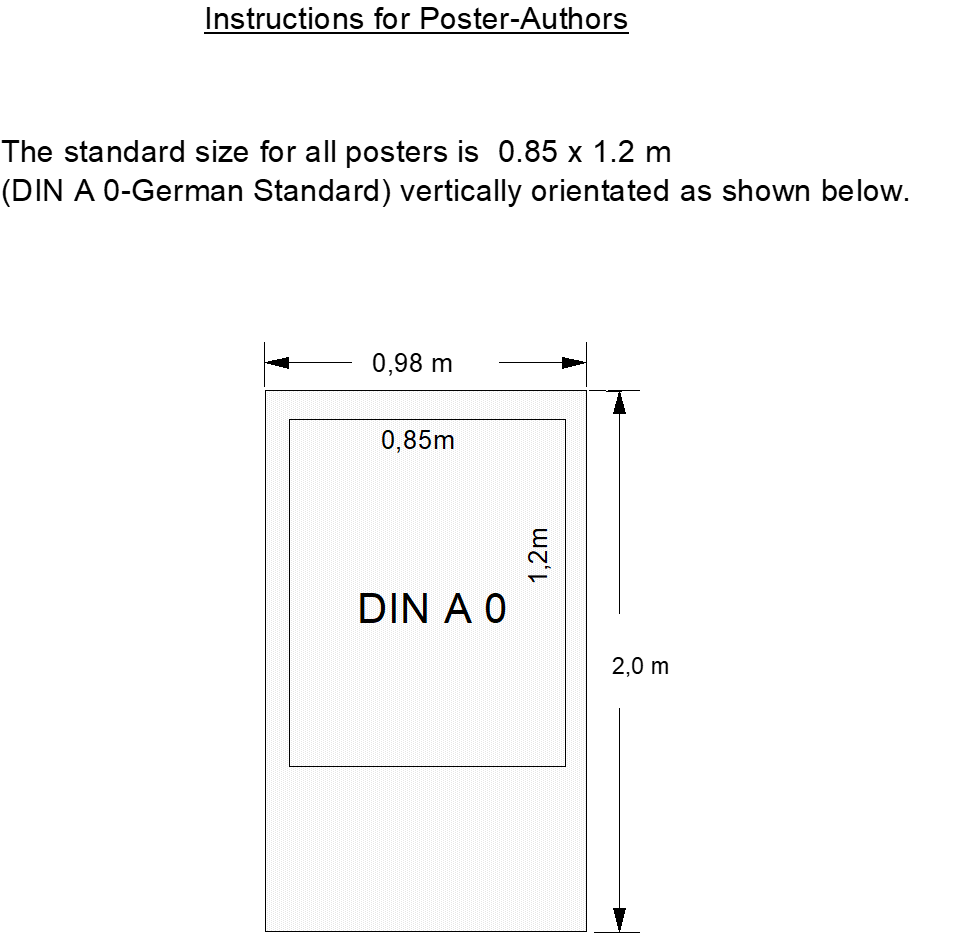
Each poster must be in the size of 0.85 m width and 1.2 m height (A0).
The poster number will be mounted on top of the board.
Please bring your printed poster to the conference venue. Please note: there will be no
possibility to print your poster onsite.
Material for attaching the posters will be supplied by the organisers. Writing or drawing on the poster board is not allowed.
Preparation of the poster
The author’s name and address and the title of the paper are to be indicated on the top section of the poster.
As a major guideline it is proposed to make the poster intelligible in itself, even in the absence of the presenting author. It is suggested to divide the content of each poster into Introduction, Results and Conclusions sections, with a summary listing the pertinent results and conclusions.
The poster should be legible from a distance of 2-3 meters.
Therefore, the minimum size should be:
- 20 cm for graphs;
- 3 cm for the paper’s title and the names/adresses of the authors in the heading label;
- 1,5 cm for sections headings such as introduction, results, labeling of figures and tables;
- 0,8 cm characters in height for further text.
Line spacing: 1,1 cm at minimum; 10 of such lines correspond to one figure.
Please use colours, symbols and schemes for improved clarity.